




A practical guide for independent artists and the labels managing them
You open your streaming profile and there is a new single you never made. The artwork looks almost right, the vocal sounds almost like you, and your followers have already been notified. In 2026 this is no longer a rare glitch. It is a growing form of fraud, and independent artists are the easiest targets.
The good news is that the tools to fight back finally exist. This guide explains how fake tracks end up on real profiles, how to use the new protections, and what labels should build into every release to keep their roster safe.
Why Fake Tracks Are Landing on Real Profiles
Generative tools like Suno and Udio mean anyone can produce a passable track and cover art in minutes. Fraudsters then sign up with a low-cost distributor, claim to be the real artist, and deliver the release with your name attached. Streaming services match it to your existing profile, and it goes live. When 404 Media tested the loophole, it said it took five minutes, as reported by Engadget in September 2026.
it is shockingly easy to post AI generated music under the name of real artists on Spotify. It took us five minutes to do. You can do it to small bands, dead artists, even Taylor Swift. This is a giant loophole in digital music distribution that's widely abused www.404media.co/spotify-ai-m…
— Emanuel Maiberg (@emanuelmaiberg.bsky.social) September 17, 2026 at 2:39 PM
[image or embed]
Not every wrong track is malicious. Many land on the wrong profile because of simple metadata errors, such as a missing artist link or two acts sharing the same name. When a release arrives without a clear link to the right artist, the system may attach it to an existing artist with the same or a similar name, as Hypebot explains. The fix starts in the same place either way: control over what gets delivered under your name.
Why It Costs You More Than Embarrassment
A fake release does real damage. It can reach your followers as if it were a genuine new release, and it can confuse curators checking your profile before a pitch. The money is the bigger problem. The streams a fake track earns are paid to whoever delivered it, not to you. Plagiarism Today notes that independent artists and profiles that are no longer active have been hit hardest, because nobody is watching them closely.
The scale is huge. Spotify said in September 2025 that it had removed more than 75 million spammy tracks in the previous 12 months, according to Music Business Worldwide. Deezer now reports receiving more than 90,000 fully AI-generated tracks a day, over half of its daily uploads.
How Spotify’s Artist Profile Protection Works
Spotify launched Artist Profile Protection as a limited beta in March 2026. It is optional, and only Admins and Editors on your Spotify for Artists team can switch it on. To check whether you have access, open the user menu from your avatar in Spotify for Artists on desktop or mobile web and look for Artist Profile Protection.
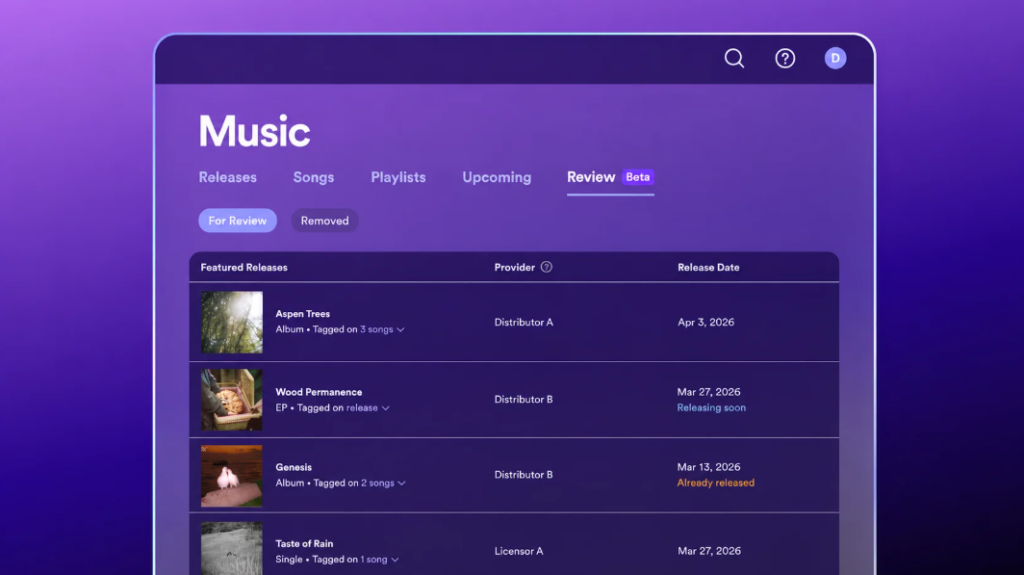
There are two modes. The default, Review releases, emails you whenever music is delivered with your name attached. You can then approve it or remove yourself. A removed release will not list you, appear on your profile, count toward your stats or show up in recommendations to your listeners.
The stricter mode, Block releases, holds every release until you approve it. It is aimed at artists who are frequently misattributed, such as those with common names. The trade-off is that your own music can be delayed if nobody on your team acts. Three details matter in practice, according to Spotify’s support page: 1) You have up to 28 days to act. In Review mode, a release you ignore goes live as scheduled with you listed on it. 2) You can generate an artist key, a unique code you give to trusted distributors so your legitimate releases go live pre-approved. Never share it publicly. 3) During the beta, releases from some providers may not be eligible, and artist keys may not work with every distributor. Ask yours whether they support it.
What to Do on Platforms Without an Equivalent
Artist Profile Protection only covers Spotify. A fake release can still appear under your name on other services, and scam releases have been found on Apple Music, Tidal and Amazon Music too. Elsewhere, your distributor is your main line of defence. Spotify’s own guidance is that the label or distributor fixes incorrect profile information, and the same is true across most platforms.
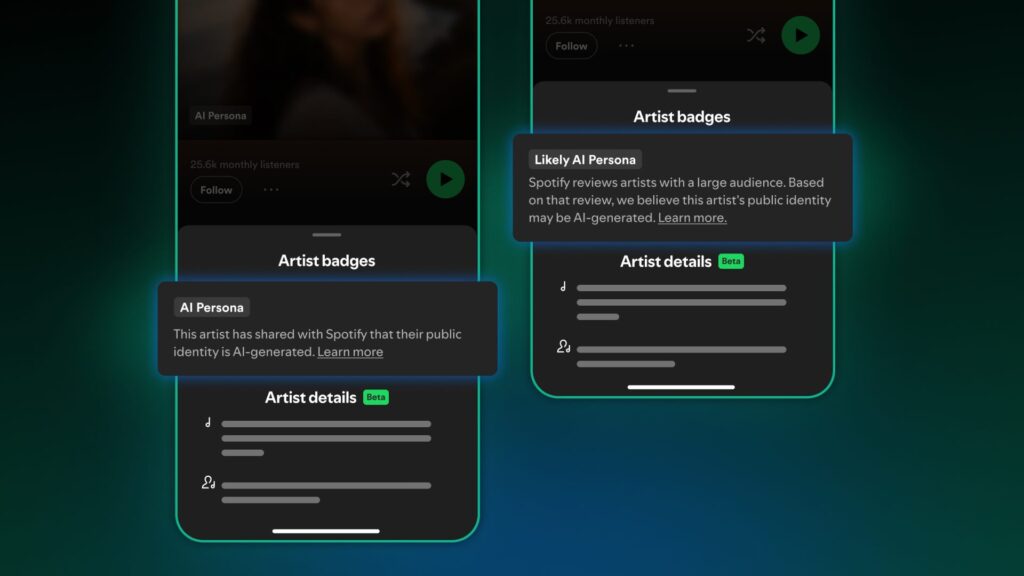
Disclosure rules are also tightening. Apple Music has confirmed “Made with AI” labels are coming later in 2026, and it puts responsibility for accurate AI tags on labels and distributors, RouteNote reports. Spotify’s new AI Persona badges flag profiles whose identity may be AI-generated rather than a real person. Using AI as a tool in your production does not on its own trigger the badge. Badged profiles are left out of editorial and algorithmic recommendations by default, which makes it harder for synthetic acts to piggyback on real ones.
A Profile Security Checklist for Labels
If you run a label, you carry this risk for every artist on your roster. Build these steps into your release process. Claim every profile. Make sure each artist has claimed Spotify for Artists and Apple Music for Artists, and that the label holds an Admin seat, not just the artist.
Keep an identity sheet. Record each artist’s exact name spelling, Spotify artist link, Apple Music link and YouTube channel, and share it with your distributor before every release.
Flag the high-risk names. Artists with common names, collaborators on one-off projects, and quiet catalogue acts are the most exposed. Consider Block mode for these where it is available.
Collect artist keys early. For collaborations, get protection keys from every featured artist well before delivery so nothing stalls on release day. Check every release live. On release day, click through each store link and confirm it sits on the correct profile. Then check profiles for anything unexpected at least once a month. Get the metadata right at delivery. Many misattributions start with a missing or inconsistent artist link, so accurate music metadata is your first layer of protection.
What to Do If a Fake Track Is Already Live
Act quickly but calmly. Collect the evidence first: links to the release and to the correct and incorrect profiles, plus the release title, UPC and ISRC if you can find them. If you have Artist Profile Protection, remove yourself from the release within the 28-day window. If you do not, report a content mismatch through Spotify for Artists and send the same details to your distributor so the correction reaches every platform.
Do not delete and re-upload your own releases to try to fix a mapping problem. That usually creates duplicates and makes things worse.
Protect Your Profile From the First Delivery
Profile security is now part of releasing music, not an afterthought. If you want a distribution partner that gets your metadata right, delivers to the correct profiles and helps you protect the royalties you earn, talk to MN2S Label Services about your next release.
MN2S works with over 500 independent labels on supporting their creative vision. Get in touch today to find out more.
Related articles
 How to Protect Your Label’s Catalogue From Artificial Streaming Penalties2 Oct 2026
 How AI is changing the music industry – and why it matters29 Jul 2025
 The New Rules for Getting Your Music Discovered on Spotify in 202618 Aug 2026
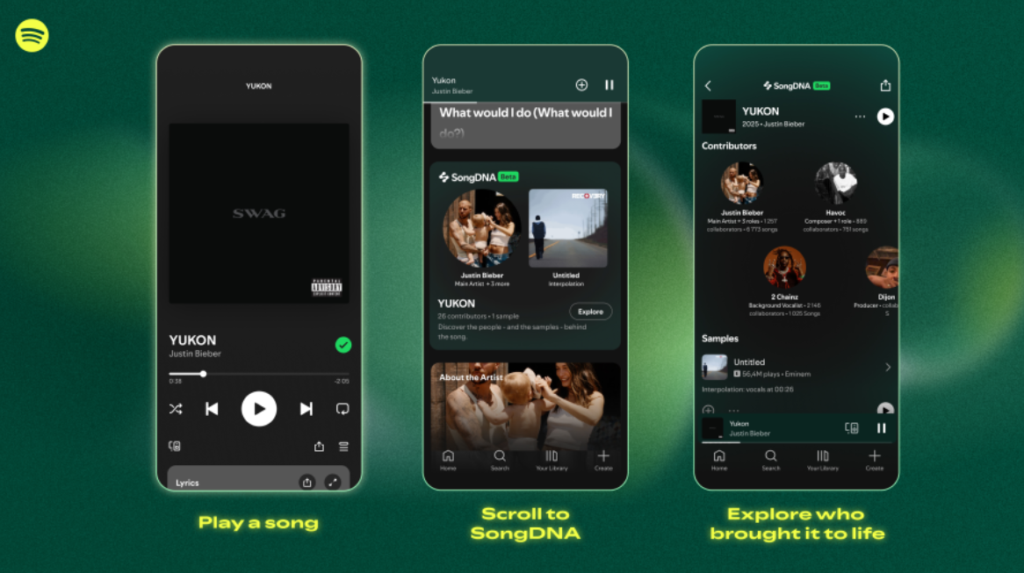 Why Your Song Credits Now Matter to Fans, Not Just Collection Societies15 Oct 2026
 Does AI Involvement Affect Your Royalties? What PRS and PPL Actually Say24 Jun 2026
 Spotify’s Fresh Finds Forward Could Change What a Playlist Placement Means for You23 Sep 2026